At camelcamelcamel we have been tracking price points of Amazon products for the past 15 years. All this data was saved into one big MySQL table that is now over 1TB in size. We decided to move it to DynamoDB to save on costs, get better performance, and reduce maintenance complexity. Composite keys where the sort key is the timestamp fit perfectly for our use case. All our queries consistently finish in less than 20ms. One of the slowest queries we had on MySQL was querying a specific product by date. In DynamoDB it is consistently fast with the new composite key of product id for primary key and timestamp for sort key. Those queries no longer affect the entire system either.
The move from MySQL to DynamoDB took a couple of months and we have learned a few important lessons along the way. See below for a summary of our lessons.
At camelcamelcamel we use CDK to deploy our infrastructure. We have a bunch of auto-scaling groups (ASG) behind Application Load Balancer (ALB). We recently started noticing an issue where a deployment that results in ASG instances being refreshed would cause a lot of 502 errors for a few minutes during the deployment. This surprised us as we already use health checks, rolling updates and signals as recommended. To get the bottom of it, we built a timeline of the events for one specific group:
[22:50:07] CloudFormation began updating the auto-scaling group
[22:51:37] One old instance is terminated
[22:52:12] A new instance is being launched
[22:54:14] The new instance signals that it’s ready
[22:54:06] The new instance logs show successful health check from ALB
[22:54:15] The second old instance is terminated
[22:54:48] A second new instance is being launched
[22:54:52] ALB logs start showing 502 errors trying to route requests to the second new instance
[22:56:50] The second new instance signals that it’s ready
[22:56:50] No more 502s
What struck us as odd was this only happened on the last instance of each group. ALB waited until the first instances of the group were ready before sending traffic their way. But for the last instance, ALB just started hammering it with traffic immediately after it was launched.
We ended up contacting AWS support to ask why the last instance of our rolling update gets requests before it’s ready. They pointed out that all of our instances were unhealthy at that time and therefore ALB turned fail-open. When all the instances are unhealthy, ALB starts sending all of them requests in the hopes that some can still handle them. The occasional handled request is better than no requests at all being handled.
We looked in CloudWatch as they suggested. The metrics of the target group’s healthy and unhealthy host count show what happened. At 22:54:15 when the second and last old instance was terminated, we got left with one unhealthy instance. At 22:54:48 when the second new instance was launched, we had 2 unhealthy instances. Since both were unhealthy, ALB was operating in fail-open and was sending requests to the first new instance and the second new instance. The first new instance was already ready for the requests, but the second one wasn’t. And so we ended up with 502 errors until the second instance was ready.
But why was the first new instance unhealthy even though it was ready? ALB only treats instances as healthy after a given number of health checks pass. We were using the default CDK target group health check configuration which is 5 consecutive health checks at a 30 seconds interval. That means any instance takes at least 2:30 minutes to be considered healthy after it’s ready. That delay was long enough and our scaling group small enough for the last instance to start-up while all the other new instances are still considered unhealthy.
The root cause of it all seems to be auto-scaling group not waiting for ALB to consider the instance healthy before moving on with the scaling operation that removes the instances that are considered healthy. We expected the recommended CDK ALB/ASG configuration to deal with this, but apparently it doesn’t.
AWS suggested a few possible solutions including adding more instances to the group and using life-cycle hooks. Life-cycle hooks allow us to control when an auto-scaling group instance is considered launched. They will delay the scaling operation until we complete the hook ourselves. So we can complete the hook only after the instance is ready and everything is installed.
A popular use of lifecycle hooks is to control when instances are registered with Elastic Load Balancing. By adding a launch lifecycle hook to your Auto Scaling group, you can ensure that your bootstrap scripts have completed successfully and the applications on the instances are ready to accept traffic before they are registered to the load balancer at the end of the lifecycle hook.
To integrate life-cycle hooks with CDK we added a life-cycle hook to our ASG, a call to aws autoscaling complete-lifecycle-action at the end of our user-data script, and a policy to our role that allows completing the life-cycle action.
Most of the code deals with preventing circular dependencies in CloudFormation. The call itself is a one-liner, but we need to get the ASG name and hook name without depending on the ASG. User-data script goes into the launch configuration and the ASG depends on it. So the user-data script can’t in turn depend on the ASG again.
import aws_cdk as core
import aws_cdk.aws_autoscaling as autoscaling
import aws_cdk.aws_iam as iam


class MyAsgStack(core.Stack):
    def __init__(self, scope: Construct, id_: str, **kwargs) -> None:
        super().__init__(scope, id_, **kwargs)

        asg = autoscaling.AutoScalingGroup(
            self, f"ASG",
            # ...
        )

        # the hook has to be named to avoid circular dependency between the launch config, asg and the hook
        hook_name = "my-lifecycle-hook"

        # don't let instances be added to ALB before they're fully installed.
        # we had cases where the instance would be installed but still unhealthy because it didn't pass enough
        # health checks. if all the instances were like this at once, ALB would turn fail-open and send requests
        # to the last instance of the bunch that was still installing our code.
        # https://console.aws.amazon.com/support/home?#/case/?displayId=9677283431&language=en
        # https://docs.aws.amazon.com/autoscaling/ec2/userguide/lifecycle-hooks.html
        asg.add_lifecycle_hook(
            "LifeCycle Hook",
            lifecycle_transition=autoscaling.LifecycleTransition.INSTANCE_LAUNCHING,
            default_result=autoscaling.DefaultResult.ABANDON,
            lifecycle_hook_name=hook_name,
        )
        asg.add_user_data(
            # get ASG name (we could use core.PhysicalName.GENERATE_IF_NEEDED again, but the ASG already exists)
            f"ASG_NAME=`aws cloudformation describe-stack-resource --region {self.region} "
            f"--stack {core.Aws.STACK_NAME} --logical-resource-id {self.get_logical_id(asg.node.default_child)} "
            f"--query StackResourceDetail.PhysicalResourceId --output text`",
            # get instance id
            "INSTANCE_ID=`ec2-metadata | grep instance-id | head -n 1 | cut -d ' ' -f 2`",
            # complete life-cycle event
            f"aws autoscaling complete-lifecycle-action --lifecycle-action-result CONTINUE "
            f"--instance-id \"$INSTANCE_ID\" "
            f"--lifecycle-hook-name '{hook_name}' "
            f"--auto-scaling-group-name \"$ASG_NAME\" "
            f"--region {core.Aws.REGION}"
        )

        # let instance complete the life-cycle action
        # we don't need cloudformation:DescribeStackResource as CDK already adds that one automatically for the signals
        iam.Policy(
            self,
            "Life-cycle Hook Policy",
            statements=[
                iam.PolicyStatement(
                    actions=["autoscaling:CompleteLifecycleAction"],
                    resources=[asg.auto_scaling_group_arn],
                )
            ],
            roles=[asg.role],
        )
After deploying the code with life-cycle hooks, our new instances won’t even register with the ALB until they’re ready. The health check delay issue still exists so we can still get into fail-open. But at least the new instances that are definitely not ready won’t be sent any requests and the user won’t be getting 502 errors.
One of my clients asked me to implement the solution Clare Liguori of AWS described in Automating safe, hands-off deployments. It’s a very interesting and detailed document describing how Amazon deploys code to production with no human interaction. It describes safe continuous delivery in cloud scale that minimizes developers interaction and failure points. When combined with AWS Well-Architected principals, it shows you the way to build a multi-tenant SaaS product made of multiple services over multiple regions and multiple accounts that follows all best practices, is easy to maintain and easy to develop. AWS provides the principals, but the implementation details vary and depend on the specific product requirements.
In this blog post I will describe how I architected and implemented this solution for one of my clients. They wanted to move their on-premise product to a SaaS offering in the cloud that can scale to millions of transactions a second. A key requirement was being able to easily deploy multiple environments in multiple regions over multiple accounts to accommodate for the security pillar, service limits, and scalability.
If you ever used CDK Pipelines to deploy stacks cross-region, you’ve probably come across support stacks. CodePipeline automatically creates stacks named <PipelineStackName>-support-<region> that contain a bucket and sometimes a key. The buckets these stacks create are used by CodePipeline to replicate artifacts across regions for deployment.
As you add more and more pipelines to your project, the number of these stacks and the buckets they leave behind because they don’t use autoDeleteObjects can get daunting. The artifact bucket for the pipeline itself even has removalPolicy: RemovalPolicy.RETAIN. These stacks are deployed to other regions, so it’s also very easy to forget about them when you delete the pipeline stack. Avoiding these stacks is straightforward, but does take a bit of work and understanding.
If you’re deploying stacks cross-account, set crossAcountKeys: true for the pipeline.
Pass the Pipeline object in CDK CodePipeline’s codePipeline argument.
Here is sample Python code:
try:
    import aws_cdk.core as core  # CDK 1
except ImportError:
    import aws_cdk as core  # CDK 2
from aws_cdk import aws_codepipeline as codepipeline
from aws_cdk import aws_kms as kms
from aws_cdk import aws_s3 as s3
from aws_cdk import pipelines

app = core.App()
pipeline_stack = core.Stack(app, "pipeline-stack")
pipeline = codepipeline.Pipeline(
    pipeline_stack,
    "Pipeline",
    cross_region_replication_buckets={
        region: s3.Bucket.from_bucket_attributes(
            pipeline_stack,
            f"Bucket {region}",
            bucket_name="insert bucket name here",
            encryption_key=kms.Key.from_key_arn(
                pipeline_stack,
                f"Key {region}",
                key_arn="insert key arn here",
            )
        )
        for region in ["us-east-1", "us-west-1", "eu-west-1"]
    },
    cross_account_keys=True,
    restart_execution_on_update=True,
)
cdk_pipeline = pipelines.CodePipeline(
    pipeline_stack,
    "CDK Pipeline",
    code_pipeline=pipeline,
    # ... other settings here ...
)
Tying it Together
The missing piece from the pipeline code above is how it gets the bucket and key names. That depends on how your code is laid out. If everything is in one project, you can create the support stacks in that same project and access the objects in them. That’s what PhysicalName.GENERATE_IF_NEEDED is for.
If the project that creates the buckets is separate from the pipeline project, or if there are many different pipeline projects, you can write the bucket and key names into a central location. For example, it can be written into SSM parameter. Or if your project is small enough, you can even hardcode them.
Another option to try out is cdk-remote-stack that lets you easily “import” values from the support stacks you created even though they are in a different region.
Conclusion
CDK makes life easy by creating CodePipeline replications buckets for you using support stacks. But sometimes it’s better to do things yourself to get a less cluttered CloudFormation and S3 resource list. Avoid the mess by creating the replication buckets yourself and reuse them with every pipeline.
A few months ago I released Lovage. It’s a Python only serverless library that’s focused more on RPC and less on HTTP and events. One of my favorite features was the simple dependency management. All external dependencies are handled in a serverless fashion. Other frameworks/libraries locally download all the dependencies (which often requires cross downloading/compiling with Docker), package them up, and then upload them with every code change. Lovage does this all in a Lambda function and stores the dependencies in a Lambda layer. It saves a lot of time, especially for minor code changes that don’t update dependencies.
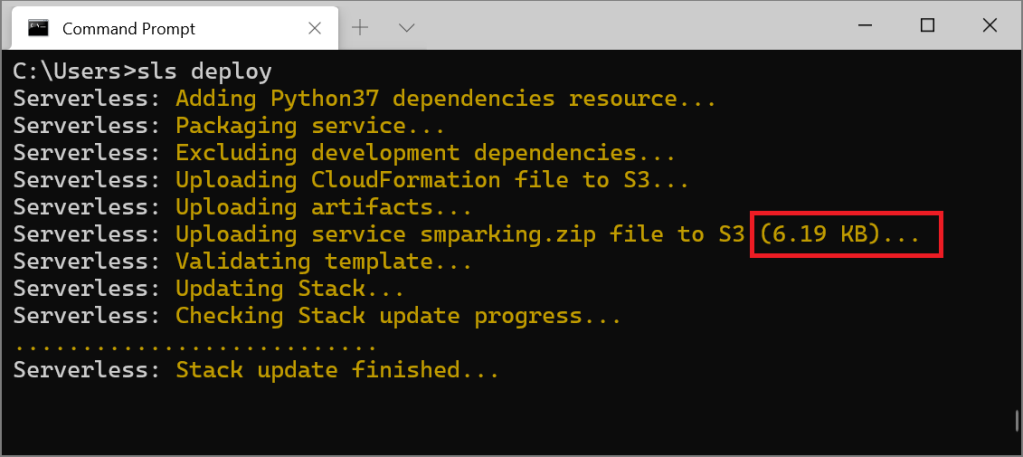
Recently I needed to create some smaller serverless projects that do use events and HTTP. I turned back to Serverless Framework. But instead of using the good old serverles-python-requirements, I decided to create serverless-pydeps. It’s another Serverless Framework plug-in that handles Python dependencies the same way as Lovage. By not handling dependency collection locally, it gains the same speed advantages as Lovage.
If you want to use it yourself, run the following command. No further configuration is needed.
sls plugin install -n serverless-pydeps
Even with a large requirements.txt file, the upload is still tiny and deployment is quick.
A lot of Docker images, like nginx, support configuration using files. The documentation recommends that you create the file locally and then mount it to your container with -v /host/path/nginx.conf:/etc/nginx/nginx.conf:ro. Other images, like grafana and redis, support similar configuration methods.
But this method doesn’t work on Fargate because the server running your containers doesn’t have access to your local files. So how can you mount configuration files into containers in Fargate?
One option is baking the configuration file into your image. The downside is that this requires building, storing, and maintaining your own image. It also makes changing your configuration much more difficult.
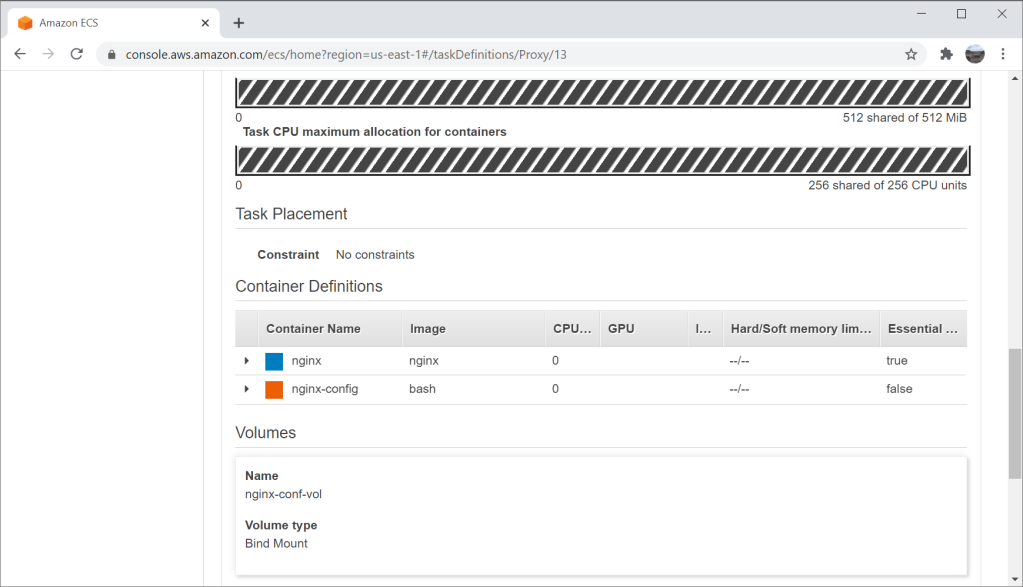
A simpler method is using a sidecar container that writes the configuration to a volume shared by both containers. The sidecar container uses images like bash or amazon/aws-cli. It can read the configuration from an environment variable, from SSM or even S3.
To add a sidecar container to your existing task definition:
Define a transient volume. When doing this in Fargate Console select Bind Mount type.
Add a new sidebar container definition to your task. Use bash or amazon/aws-cli as the image.
Mount the new volume into your new sidecar container.
Update the command of sidecar container to read the configuration and write it to the mounting point.
Update your existing container definition to also mount the same volume to where the image is expecting the configuration file.
Set your existing container to depend on the new sidecar container to avoid any race conditions.
For example, if we want to configure nginx container using the following configuration file, we can use bash to write it to /etc/nginx/nginx.conf. To avoid any issues with newlines, we will base64 encode the configuration file and put it in the environment of the sidecar container.
All this takes just a few lines with CloudFormation but can be done using other APIs as well. As you can see, this template defines a task definition with two containers. One container is nginx itself, and the other is the sidecar container. Both of them mount the same volume. The main container depends on the sidecar container. The sidecar container takes the configuration from the environment, decodes it using base64 and writes it to /etc/nginx/nginx.conf. Since both containers use the same volume, the main container will see and use this configuration file.
After deploying this template, you can launch a Fargate task and the result will be a simple web server proxying all requests back to this blog.
This is a very raw example. You would usually want to enable logs, and get configuration from somewhere dynamic in production. But it shows the basics of this sidecar method and can be applied to any Docker image that requires mounting a configuration file.
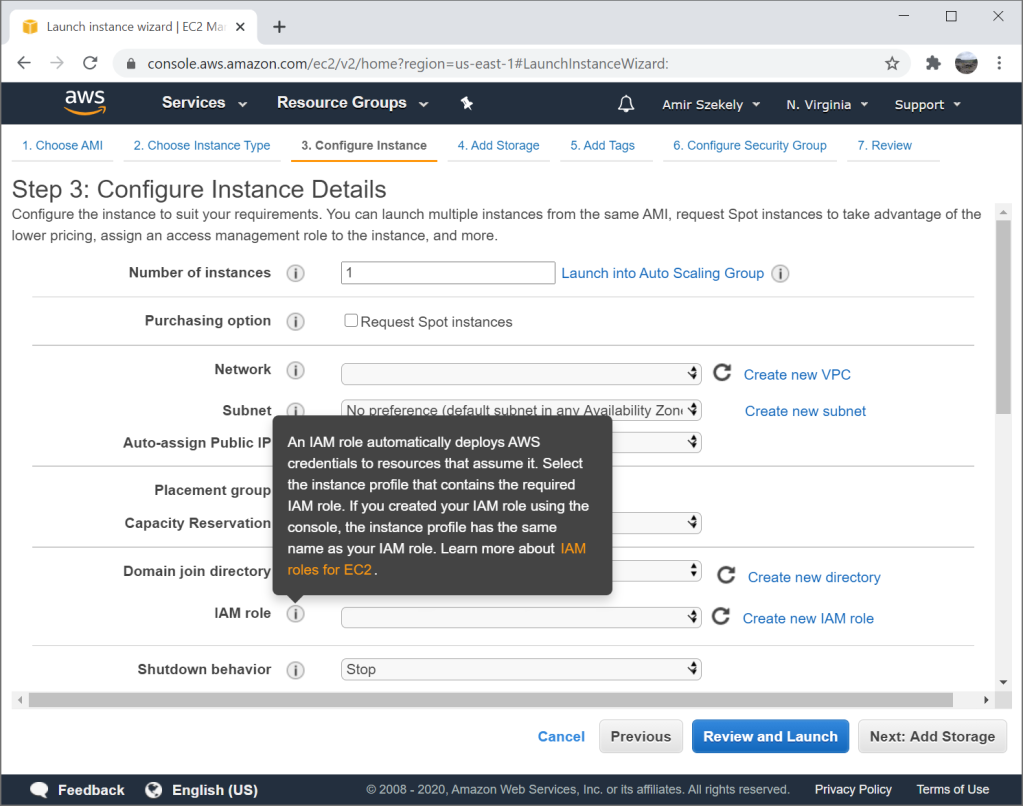
EC2 instance profiles allow you to attach an IAM role to an EC2 instance. This allows any application running on the instance to access certain resources defined in the role policies. Instance profiles are usually recommended over configuring a static access key as they are considered more secure and easier to maintain.
Instance profiles do not require users to deal with access keys. There is one less secret to securely store and one less secret that can leak.
Instance profiles can be replaced or removed using EC2 API or in EC2 Console. There is no need to make your application configuration dynamic to change or revoke permissions.
Instance profiles, and roles in general, provide temporary credentials per-use. If those credentials leak, the damage is contained to their lifespan.
But how does an application running on EC2 use this instance profile? Where do the credentials come from? How does this work without any application configuration change?
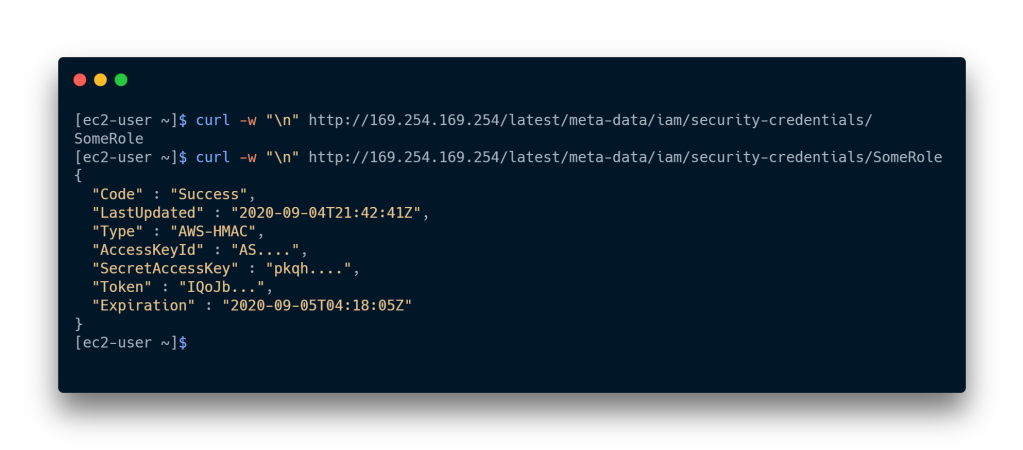
EC2 shares the credentials with the application through the metadata service. Each instance can access this service through http://169.254.169.254 (unless disabled) and EC2 will expose instance-specific information there. The exposed information includes AMI id, user-data, instance id and IPs, and more.
The instance profile credentials are exposed on http://169.254.169.254/latest/meta-data/iam/security-credentials/. When you curl this URL on an EC2 instance, you will get the name of the instance profile attached to the instance. When you curl the same URL with the instance profile name at the end, you get the temporary credentials as JSON. The metadata service will return access key id, secret access key, a token, and the expiration date of the temporary credentials. Behind the scenes it is using STS AssumeRole.
All this data can be used to configure any application to use the role attached to the instance profile. You just have to be careful not to use it past the expiration date. You must also remember to check for new temporary credentials once the expiration date passes. If you are going to use these credentials manually, remember that the token is required. Normal user access keys don’t have a token, but temporary credentials require it.
To save you on curl calls and to automate this process further, all AWS SDKs check the instance profile for credentials first. As you can see in the source code, this is exactly what the Python SDK, botocore, does to get credentials from the instance profile. In the end, everything just works as expected, and no application configuration is required.
Migrating from a small hard drive to a bigger hard drive usually means copying the raw data of the drive using dd, increasing the partition size using cfdisk, and then finally resizing the file system to fit the whole partition with something like resize2fs. This process is usually done while booted from another drive or live USB, but it is possible to modify partitions on mounted drives in relatively modern systems.
This process is always scary and time consuming, especially when booting from another drive. Any small mistake can brick your drive and cause data loss. And whether you use a nice GUI utility like gparted or not, there are many steps that can go very wrong if you’re not paying attention. The recommended backup step makes this process even longer.
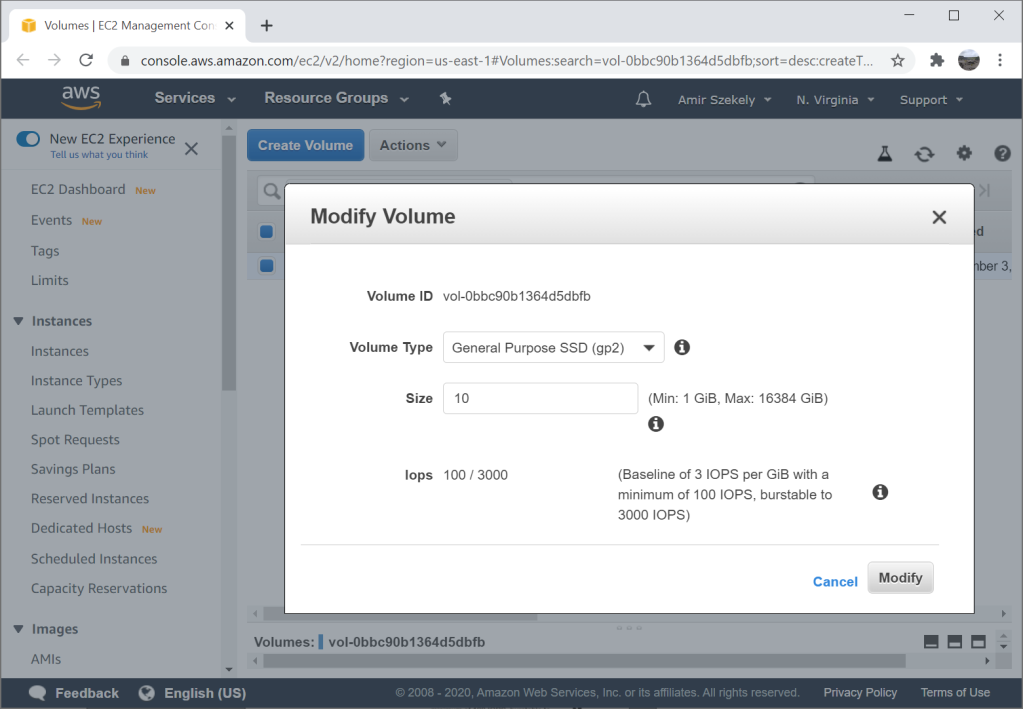
All the complexity and potential for data loss made me appreciate EBS even more. It was a pleasent surprise when my file system was automatically the right size after a few button clicks in EBS. I didn’t even SSH into the machine and it was done. Just modify the EBS volume while the machine is running and reboot when it’s done (it is possible to skip the reboot but you would have to extend the partition manually).
So how does this work? Does EBS automatically modify the partition and resize the file system? Is the volume attached to a hidden EC2 instance that handles it for you? Is it something else?
It is your EC2 instance itself that extends the partition and resizes the file system. This is done automatically by cloud-init which is a program that comes preloaded on most AMIs. This program is in charge of initializing cloud instances and works on AWS, GCP, Azure, and others. It can take care of common tasks like retrieving instance metadata, setting up SSH keys, and it even executes UserData on AWS.
If you check out the log file at /var/log/cloud-init.log after increasing a volume size and rebooting, you will find something like the following.
Sep 03 23:58:49 cloud-init[2276]: cc_growpart.py[DEBUG]: No 'growpart' entry in cfg.  Using default: {'ignore_growroot_disabled': False, 'mode': 'auto', 'devices': ['/']}
Sep 03 23:58:49 cloud-init[2276]: util.py[DEBUG]: Running command ['growpart', '--dry-run', '/dev/nvme0n1', '1'] with allowed return codes [0] (shell=False, capture=True)
Sep 03 23:58:49 cloud-init[2276]: util.py[DEBUG]: Running command ['growpart', '/dev/nvme0n1', '1'] with allowed return codes [0] (shell=False, capture=True)
Sep 03 23:58:50 cloud-init[2276]: util.py[DEBUG]: resize_devices took 0.116 seconds
Sep 03 23:58:50 cloud-init[2276]: cc_growpart.py[INFO]: '/' resized: changed (/dev/nvme0n1, 1) from 8587820544 to 10735304192
Sep 03 23:58:50 cloud-init[2276]: stages.py[DEBUG]: Running module resizefs (<module 'cloudinit.config.cc_resizefs' from '/usr/lib/python2.7/site-packages/cloudinit/config/cc_resizefs.pyc'>) with frequency always
Sep 03 23:58:50 cloud-init[2276]: handlers.py[DEBUG]: start: init-network/config-resizefs: running config-resizefs with frequency always
Sep 03 23:58:50 cloud-init[2276]: helpers.py[DEBUG]: Running config-resizefs using lock (<cloudinit.helpers.DummyLock object at 0x7fd3a1a50290>)
Sep 03 23:58:50 cloud-init[2276]: cc_resizefs.py[DEBUG]: resize_info: dev=/dev/nvme0n1p1 mnt_point=/ path=/
Sep 03 23:58:50 cloud-init[2276]: cc_resizefs.py[DEBUG]: Resizing / (xfs) using xfs_growfs /
Sep 03 23:58:50 cloud-init[2276]: cc_resizefs.py[DEBUG]: Resizing (via forking) root filesystem (type=xfs, val=noblock)
Sep 03 23:58:50 cloud-init[2452]: util.py[DEBUG]: Running command ('xfs_growfs', '/') with allowed return codes [0] (shell=False, capture=True)
Notice cloud-init detected the volume size changed, automatically called growpart with the right parameters to increase the partition size to fill the volume, detected the file system type, and called xfs_growfs to grow the file system.
cloud-init is configured with /etc/cloud/cloud.cfg which contains various configuration and a list of all the modules that should be executed. On most AMIs this includes the two modules we saw in the log: growpart and resizefs which are loaded from cc_growpart.py and cc_resizefs.py. In the source code you can see all the magic of detecting the size, file system, and choosing the right tools for the job.
This solution allows EBS to remain simple and file-system agnostic, while providing good yet configurable user experience. I was pretty impressed when I realized how it works.
Everyonceinawhile, theconcept of a simple password manager that needs no storage and no state comes back around. The details differ but the basic premise is always the same. Instead of saving your passwords and encrypting them with a key derived from a master password, these password managers generate passwords on the fly by hashing a master password with the website name. To get your password back, you simply need to remember your master password and the exact name you used for any specific website.
It’s an intriguing technical idea but it sacrifices security and usability. I won’t touch on the security issues here as there are far more qualified people than me that have already addressed this topic. Instead I will focus on the significant usability concerns that would send any user looking for an alternative within days if not hours.
There is no indication if you have used this password manager for a particular website. This may be considered a privacy feature, but can make migrating passwords from different managers more difficult.
Saving multiple passwords for a single website is cumbersome. Since your only input is the website name, you have to include the username in the website name if you want to save multiple passwords for a single website. But what happens if you didn’t plan ahead and saved your first password without the user name? You now have to change the password.
Some websites have weird password requirements. If the default password generation scheme doesn’t fit exactly, you’re out of luck. This can be solved by adding the password rules to the website name, but then you have to remember the rules and type them every time you need your password.
You can’t change a password without changing the website name. Periodical password changes are still required by a lot of websites and even strong passwords can leak by human error. This leaves the user having to remember more than website name but the password iteration. Is it github1, github2 or github53 now?
It is impossible to change your master password without changing all the passwords for all websites you’ve used with the password manager. The master password is directly used to create all those passwords and when it changes, all passwords must change too. To make matters worse, you don’t have a list of websites you’ve used with this password manager. This essentially means you have to remember and try multiple master passwords until you get the right one.
Any security update or bug fix that alters the password generation algorithm will require all passwords to be changed. Standard password managers can simply rebuild their database but since there is no database here and the master password directly affects everything, all passwords must be changed.
All these issues combined mean you have to change your passwords way more often than usual, have to plan ahead a lot, and be very consistent or risk losing your passwords. It requires far more attention than I would be willing to pay just to get a cool stateless solution. At the end of the day, this solution is just not user-friendly.
Testing on production data is very useful to root out real-life bugs, take user behavior into account, and measure real performance of your system. But testing on production databases is dangerous. You don’t want the extra load and you don’t want the potential of data loss. So you make a copy of your production database and before you know it has been two years, the data is stale and the schema has been manually modified beyond recognition. This is why I created RDS-sanitized-snapshots. It periodically takes a snapshot, sanitizes it to remove data the developers shouldn’t access like credit card numbers, and then optionally share with other AWS accounts.
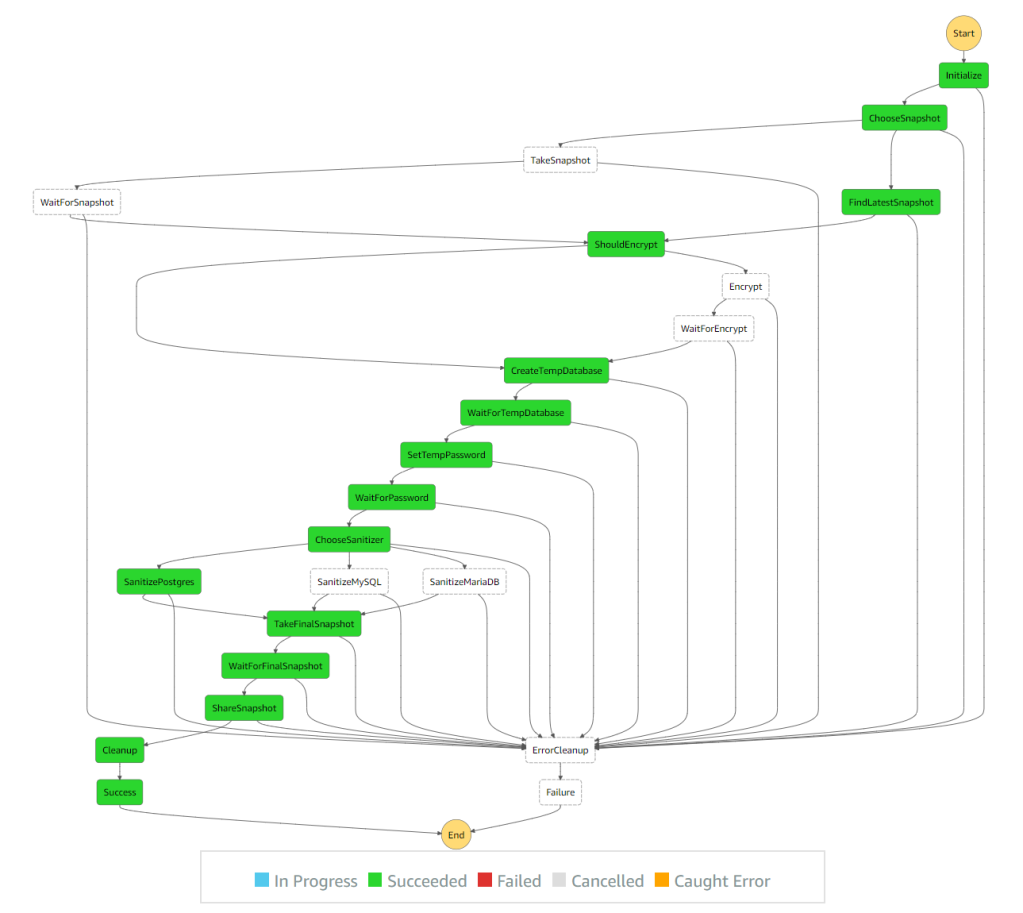
There are many examples around the web that do parts of this. I wanted to create a complete solution that doesn’t require managing access keys and can be used without any servers. Since all of the operations take a long time and Lambda has a 15 minutes time limit, I decided it’s time to play with Step Functions. Step Functions let you create a state machine that is capable of executing Lambda functions and Fargate tasks for each step. Defining retry and wait logic is also built-in so there is no need for long running Lambda functions or EC2 instances. It even shows you the state in a nice graph.
To create a sanitized snapshot we need to:
Create a temporary copy of the production database so we don’t affect the actual data or the performance of the production system. We do this by taking a snapshot of the production database or finding the latest available snapshot and creating a temporary database from that.
Run configured SQL queries to sanitize the temporary database. This can delete passwords, remove PII, etc. Since database operations can take a long time, we can’t do this in Lambda due to its 15 minutes limit. So instead we create a Fargate task that connects to the temporary database and executes the queries.
Take a snapshot of the temporary database after it has been sanitized. Since this process is meant to be executed periodically, the snapshot name needs to be unique.
Share snapshot with QA and development accounts.
Clean-up temporary snapshots and databases.
If the database is encrypted we might also need to re-encrypt it with a key that can be shared with the other accounts. For that purpose we have a KMS key id option that adds another step of copying the snapshot over with a new key. There is no way to modify the key of an existing database or snapshot besides when copying the snapshot over to a new snapshot. Sharing the key is not covered by this solution.
The step function handles all the waiting by calling the Lambda handler to check if it’s ready. If it is ready, we can move on to the next step. If it’s not ready, it throws a specific NotReady exception and the step function retries in 60 seconds. The default retry parameters are maximum of 3 retries with each wait twice as long as the previous one. Since this is not a real failure but an expected one, we can increase the number of retries and remove the backoff logic that doubles the waiting time.
One complication with RDS is networking. Since databases are not accessed using AWS API (and RDS Data API only supports Aurora), the Fargate task needs to run in the same network as the temporary database. We can theoretically create the temporary database in the same VPC, subnet and security group as the production database. But that would require modifying the security group of the production database and can pose a potential security risk or data loss risk. It’s better to keep the temporary and production databases separate to avoid even the remote possibility of something going wrong by accident.
Another oddity I’ve learned from this is that Fargate tasks with no route to the internet can’t use Docker images from Docker Hub. I would have expected the image pulling to be separate from the execution of the task itself like it was with AWS Batch, but that’s not the case. This is why the Fargate task is created with a public facing IP. I tried using Amazon Linux Docker image from ECR, but even that requires an internet route or VPC Endpoint.
All the source code is available on GitHub. You can open an issue or comment here if you have any questions.


 kichik's blog